How to Hardwire a Dash Cam With a Fuse Tap (No Warranty Risk)
A fuse tap hardwire kit is the difference between a dash cam that only works while you drive and one that watches your car in a parking lot. Here's how to do it safely.
Disclosure: This article contains affiliate links. If you buy through them we may earn a commission at no extra cost to you.
Why the 12V socket isn't enough
Plugging a dash cam into your 12V accessory socket works fine for driving footage, but it only powers the camera when the car is on (or briefly after, depending on the vehicle). Parking mode — the feature that actually catches hit-and-runs, break-ins, and shopping-cart dings — needs constant low-draw power while the car is off. That means either running the camera off its internal battery/supercapacitor for a few hours, or hardwiring it into a fuse that stays live with the ignition off.
A fuse tap hardwire kit is the standard way to do this. It's a small harness that splices into an existing fuse slot in your fuse box, taps a few milliamps for the camera, and includes a low-voltage cutoff module so the camera stops drawing power before it can kill your starter battery.
No spam. Unsubscribe anytime.
Does hardwiring void your warranty?
No — and this is worth stating plainly because it stops a lot of owners before they start. The Magnuson-Moss Warranty Act (US federal law) prohibits a manufacturer from voiding your vehicle warranty just because you installed an aftermarket accessory, unless the manufacturer can show that specific accessory caused the failure you're claiming under warranty. A fuse tap kit that adds a few milliamps of draw to an existing circuit, installed correctly, isn't going to cause a transmission failure or an electrical fault a dealer could plausibly pin on it. What can create a real problem is a sloppy install — a pinched wire behind a panel, a fuse tap in the wrong slot pulling more current than the fuse rating allows, or a hardwire kit without a low-voltage cutoff that drains the battery repeatedly. Do the install carefully and this isn't a real risk.
What you need
- A hardwire kit matched to your camera's connector (most dash cam brands sell their own, and generic mini-USB/USB-C kits work broadly)
- A fuse tap (add-a-circuit) set with the correct fuse sizes for your vehicle — check your owner's manual fuse diagram, not a generic chart
- A trim removal tool (a flathead wrapped in tape works in a pinch, but a real tool avoids cracked plastic clips)
- Electrical tape or a few zip ties for cable routing
Step by step
- Find the right fuse box. Most vehicles have a fuse panel under the dash near the driver's left knee, and often a second box under the hood. You want a fuse that's "always on" (ACC or IGN circuits go dead with the key off — you need a constant 12V circuit, sometimes labeled "battery" or numbered without an ACC designation in the manual).
- Confirm with a multimeter. Test the fuse slot with the key off. If you're getting 12V with the ignition off, that's your constant-power circuit.
- Match the fuse tap amperage to the existing fuse, not to the dash cam's draw — you're splicing in parallel with a very low-draw device, so the original fuse rating for that circuit should stay unchanged.
- Route the cable along the headliner and A-pillar, tucking it under trim panels rather than leaving it exposed across the windshield.
- Ground the hardwire kit's ground wire to a metal bolt point, not a plastic panel screw.
- Set the low-voltage cutoff on the kit (commonly adjustable between 11.5V and 12.5V) so the camera stops pulling power well before your starter battery is compromised — 12.0V is a reasonable default for most vehicles.
Why parking mode is worth the install
Without hardwiring, your dash cam is a driving-footage-only device. With it running in parking mode, it becomes the thing that catches the door ding in the grocery lot, the key scratch down your quarter panel, or the hit-and-run while you're at work. That single piece of footage is often the difference between an insurance claim that gets paid and one that doesn't. For the mechanics of which parking mode setting to use once you're wired up, see buffered vs. low-bitrate parking mode — they behave very differently and one drains your battery a lot faster than the other.
Cameras worth hardwiring for parking mode: the REDTIGER F7NP supports motion-triggered parking mode over a hardwire kit —
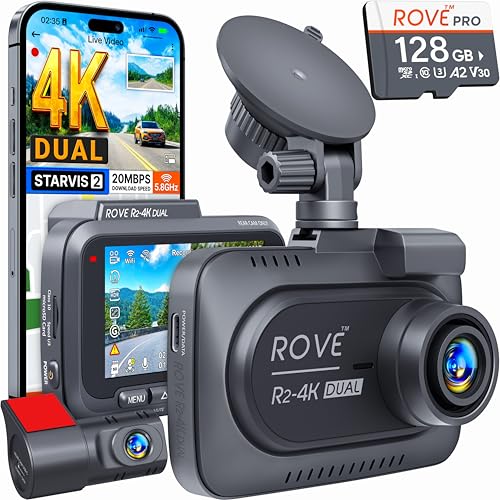
— and the ROVE R2-4K Dual's included 128GB card gives you enough storage headroom that parking mode footage doesn't immediately overwrite your driving clips.
Common install mistakes to avoid
The most frequent mistake isn't wiring — it's picking the wrong fuse. Tapping into an ACC-only circuit defeats the entire purpose of hardwiring, since that circuit still cuts power the moment you turn the key off, leaving you back at square one with no parking-mode coverage. The second most common mistake is skipping the multimeter test and trusting a generic fuse-box diagram found online; those diagrams are frequently wrong for trim-level variations within the same model year, so always verify with an actual meter reading before committing to a fuse slot. Third, a lot of installs fail cosmetically rather than electrically — a cable draped visibly across the dash instead of tucked behind trim looks unfinished and is more likely to snag or get pulled loose during normal cabin use. For a full walkthrough of which parking mode setting to actually enable once your camera is hardwired, see our under-$150 parking mode roundup, which covers real-world sensitivity tuning across several budget cameras.
The bottom line
If your car sits on the street or in a shared lot regularly, hardwiring isn't optional gear-nerd stuff — it's the feature that actually earns the dash cam's keep. The install takes under an hour with basic tools, doesn't touch your factory warranty when done correctly, and turns a driving camera into a 24/7 witness. Pair it with a camera that has real parking-mode support, set the cutoff voltage conservatively, and route the wiring cleanly so nothing rattles loose on rough roads.
Affiliate Disclosure